-
Widgets
Other complex widgets


Advanced Features of Webix JavaScript Kanban
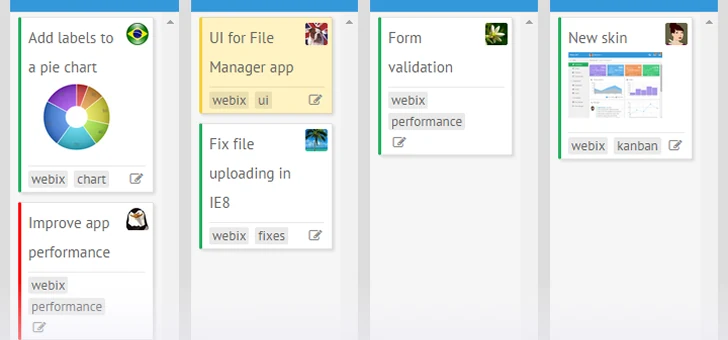
Webix Kanban provides a production-ready JavaScript Kanban component for building project management applications with task management and workflow visualization capabilities.
 Drag-and-drop cards between columns
 Filtering and searching tasks by API
 Single or multiple card selection
 Expandable and collapsible columns

Card Editor and Custom Forms
Skip building and maintaining a custom editing UI with built-in card editor for text, color, status, assignee, tags, and attachments. Get a consistent editing experience across the whole board from day one. Since the editor is a configurable window, it can be customized with any combination of Webix controls.

File Attachments
Keep task-related files alongside the work they belong to. Add and manage attachments directly from Kanban cards, with files displayed inside the built-in card editor. Configure file uploading through your backend and keep attachment data associated with each task.

Tags, Colors and Priority Marks
For better visualization define a shared collection of tags and colors once, and assign them through the editor or directly in your dataset. This makes it easy to scan the board at a glance while urgent, blocked, or high-priority tasks stand out immediately.

Comments on Cards
Webix Kanban lets you enable comments with a single line of code and every card gets its own thread, powered by the built-in Comments widget. Stay informed with questions and updates attached to each card, so the team doesn't have to jump to messaging apps to discuss the ticket.

User List for Quick Assignment
Assign a task with a click on the card itself by adding a user list and a users array with names and avatars. A couple of config lines instead of a custom picker component allow teams to instantly see who's working on what.

Context Menu with Card Actions
A built-in right-click context menu lets users edit, copy, and remove cards out of the box, while keeping them clean for the people reading the board. You can also add custom actions and customize how they behave with event handlers.

Markdown-Formatted Card Content
Webix Kanban supports Markdown formatting, allowing card descriptions to include headings, bold text, links, and lists. Use the built-in Markdown parser for a quick setup, or replace it with any third-party Markdown library to fit your existing application setup.

Multi-Level Board Structure
Adapt the Kanban board to complex workflows with subcolumns, swimlanes, and custom layouts. Combine Kanban lists, Data Views, rows, and columns to create multi-level board structures, display cards vertically or side by side, and organize multiple task areas within a single board.

Rendering Performance for Large Boards
Webix Kanban maintains excellent performance on large boards. Even if there are hundreds or thousands of cards on the task board, the interface remains fast and smooth. You can enable optimized rendering to update only changed elements and display cards within the visible area, helping avoid delays and maintain responsive performance.
Build powerful web interfaces with Webix JavaScript Kanban
Why Use Webix JS Kanban for Project Management Apps

Easy Backend Integration
Connect the board to PHP, Node.js, Golang and .NET or any other backend technology without rewriting your API layer.

Fully Customizable UI
All Webix Kanban board elements can be adjusted through API, without need to edit anything in source files.

Framework-Friendly Component
Like all Webix components Kanban works with all modern frameworks or can be integrated into React or Angular apps.

Lightning-Fast Rendering
Dynamic tasks rendering of the component in the combination with a pure JavaScript code keeps large boards responsive.
Webix Kanban for Industries & Business Solutions

Software Development
Kanban helps teams manage their backlog, development, testing, and releases throughout the entire development cycle.

Project Management
Kanban allows you to track the progress of any IT projects, marketing campaigns, and design projects without rigid sprints.
Help Desks
Each support ticket becomes a Kanban card that moves from "New" to "Closed," making it easy to track the status of requests.

Sales Pipelines
Kanban is ideal for visualizing the sales process and is used in CRM systems, where all incoming leads move between columns from "Lead" to "Lost" or "Won."

HR and Recruitment
A Kanban board allows you to track candidates from application submission to the employee's first day on the job, ensuring transparency in the recruiting process.

Manufacturing
It was in manufacturing that Kanban first emerged, and since then it has been used for inventory management, supply control, parts production, and logistics organization.
Webix Kanban Board Use Cases


JavaScript Kanban Coding Samples
Explore supplied code samples to get an idea of how the Kanban JS widget can be used in web applications.


Start Building with Webix Webix Kanban


Kanban Free Trial
Try Webix Kanban free for 30 days with full access to the widget and our technical support team with no credit card required.
Webix Kanban Licenses & Prices
How Kanban Works in Workflow Management?
The process of planning in the Kanban methodology consists of splitting the project into series stages. Tasks move through these stages as work progresses and can be assigned to team members. The Kanban board interface allows for tracking the progress of individual tasks and the overall workflow. The simplicity and clarity of Kanban make it well suited for planning and task management applications.
1
Split the project into stages
Define a clear workflow and break the project down into a series of stages (columns).

2
Create tasks
Formulate specific tasks to complete each stage.

3
Assign resources
Allocate team members or implementers to each task.

4
Track progress in a Kanban board
Move tasks across stages in the Kanban interface and monitor status in real time.

5
Achieve project goals
Keep an eye on every task and the big picture to deliver the whole project.


Frequently Asked Questions
What is the Webix Kanban Board?
Webix Kanban Board is a JavaScript/HTML5 UI component that lets developers build a drag-and-drop task board with configurable columns, cards, tags, comments, and user assignment. It is ready to integrate into any web project built with any framework.
Do I need a commercial license to use Kanban?
Yes. The Kanban widget is part of Webix Pro and can be purchased separately in the Custom pack or as a part of pre-defined team license packs such as DevTeam, Company or Unlim.
Can I edit how cards look and behave?
Yes. Both Kanban cards' appearance and behavior can be easily configured. UI is controlled via templates, and actions like editing, tagging, coloring, comments are controlled through configuration properties, without need to touch the source code.
Does Kanban support Markdown in card text?
Yes, since version 11.4 Webix Kanban card text can be parsed and styled automatically by setting the textFormat property to "markdown".
How do I connect Kanban to my backend?
Kanban loads and saves data through a standard url data source and works with any backend or REST API.
Will Webix Kanban stay fast with large task boards with thousands of cards?
Yes. The widget only re-renders cards that actually changed, and you can turn on dynamic rendering per list so only the cards currently in view are drawn.
Can I use Webix Kanban for free?
Actually, Webix Kanban is a commercial component, but you can start with a 30-day totally free trial with full functionality and access to technical support.
Related Blog Posts

Create Rich User Interfaces with Kanban JS Widget